Degree Online Services, Telangana (DOST)
Swami Vivekananda Degree and PG college Mahabubnagar will be sending a series of information required for DOST to build your future career from time to time.
Frequently Asked Questions
Where can I find notifications, press releases, timetables etc issued by DOST?
All the notifications issued by DOST will be available on the menu bar of DOST website https://dost.cgg.gov.in
What are the pre-requisites to register in DOST?
The candidate must seed his/her mobile number with Aadhaar, update name, gender and date of birth as per SSC/Intermediate certificate in Aadhaar in advance.
What is pre-registration?
Pre-registration is to authenticate the student and generate DOST ID.
What is the registration procedure for DOST?
A candidate needs to visit https://dost.cgg.gov.in
1) To register for DOST ID.
2) Pay the registration fee
3) Fill the application
4) Exercise web options
Is it mandatory to have Aadhaar for admission in DOST?
Yes.
Is it mandatory to have mobile seeded to Aadhaar for admission in DOST?
It is recommended to have mobile seeded to Aadhaar.
Can a candidate who has studied in other State also apply for admission in DOST?
Yes.
I do not have mobile number, can I register in DOST?
No. It is mandatory to have an active mobile number. The student is advised to use the same mobile number throughout the admission process of DOST.The candidate can use his/ her parents / guardians mobile number to register in DOST.
I don't remember if my mobile is seeded with Aadhaar or not. What do I do?
You can verify it by using the link “Verify your mobile linkage with Aadhaar” on DOST official website at https://dost.cgg.gov.in
How can I update mobile number with Aadhaar?
Please visit nearest Aadhaar updation centre / Mee Seeva /Post Office to update your mobile number with the Aadhaar.
Can polytechnic pass out students apply in DOST?
Yes.
Can advanced supplementary students apply for DOST?
Yes. Advance supplementary students can apply in DOST during 3rd phase of DOST.
I have entered valid details, but I did not get OTP?
Please make sure that, Do Not Disturb (DND) service is not active on the registered mobile number. If OTP is not received use Resend OPT service.
What is the registration fee for DOST?
The candidate needs to pay Rs. 200/- as registration fee online. Late fee will be Rs 400/-For late registration dates kindly visit DOST official website at https://dost.cgg.gov.in and refer to section Admission Schedule, DOST.
Is the registration fee refundable?
No.
What are the different modes of payment available for DOST?
Online payment through T-Wallet/Debit card/ Credit card / Net Banking.
How do I log into DOST?
After Pre-registration DOST ID is generated. After successful payment of the registration fee, PIN is sent to candidate’s registered mobile number, using these credentials (DOST ID & PIN) he / she can log into DOST.
Where can I enter my caste and income details?
Through candidate login, candidate will submit application for registration by entering the login details sent to him/her (DOST ID & PIN). In this application the, candidate is required to enter student details and give meeseva numbers of income and caste certificates.
Can I edit the application form after submitting?
Yes, before the submission of web options the candidate can edit or make changes to the registration application.
Can I take the print of the registration application?
Yes. After successful submission of the application, student can take print out of the same and verify the details submitted by him/ her.
How do I check if I have paid for my registration fee or not?
In the application fee payment tab, enter your DOST ID and click on proceed for payment. If your payment was successful then you get the message “Application fee already paid”.
What is the maximum number to choose/ prioritize courses/colleges whileexercising web options?
Candidate can choose/ prioritize any number courses/ colleges during web options.
In case of insufficient web options, can I get admission with the selected course and district?
If you agree to a provision to join any Government Degree College in selected course and district during exercising web options. The allotment will be subjected to availability.
How many times the web options can be edited?
Before submission of the web options, it can be edited any number of times.
Can I take the print of the submitted web options?
Yes.
What are HLC’s ?
Help Line Centres are for the Students, who will be facing difficulty during registrations due to mismatch of various details. The list of helpline centres are given at the home page.
Where can I find the HLC?
List of HLC’s are uploaded on the DOST website. You need to search your nearby HLC through the list available on home page. Page 3 Degree Online Services Telangana.
Who needs to visit HLC?
In case of any mismatch in the details provided by the candidate. He/ She needs to visit the HLC with the relevant documents for physical verification.
Where can I find the colleges/ courses information?
At DOST home page. By clicking on the link “SEARCH BY COLLEGE / COUSRE” (on right side of the page).
I forgot / lost my PIN. How do I get back my PIN?
Please use Forgot Pin option at the home page (at candidate login tab).
My Application status is shown as pending at HLC, what does it mean?
In case of mis-match between your Intermediate details and Aadhaar details, application will be verified by HLC. After the scrutiny by the HLC Officer, the application status will be changed and SMS will be sent to the registered Mobile Number.
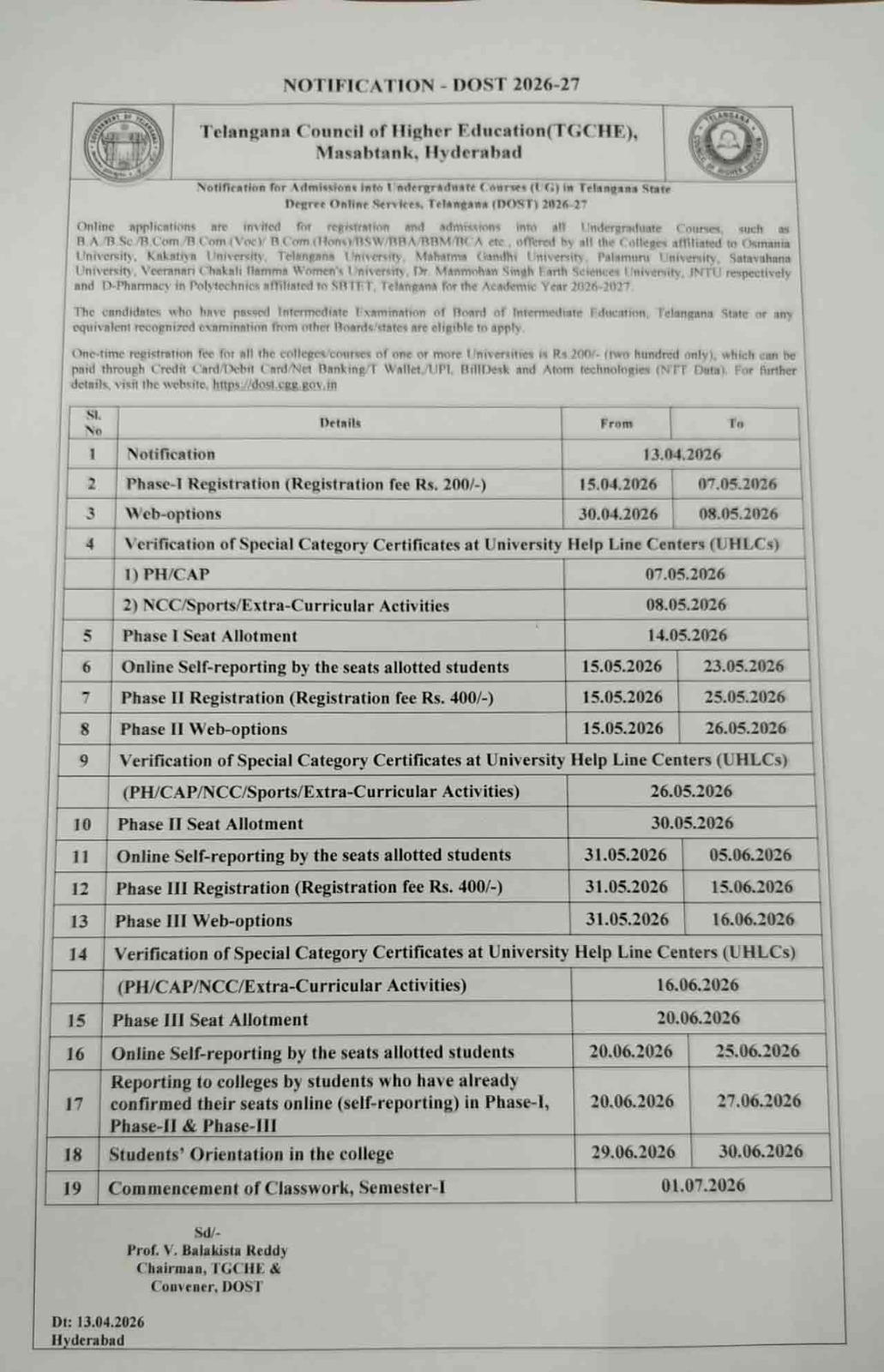
Admission Schedule, DOST 2026
Admissions for the academic year 2026–27 will be processed through Degree Online Services Telangana (DOST 2026). Students are advised to stay updated through the official portal or contact the college Admission Cell for assistance.